algorithmic modeling for Rhino
Mosquito
Information
Tools to access streaming vectors maps and data sources such as Flickr, Twitter, Facebook, Google Maps, GeoData, StockMarket
...and a bunch of other stuff
Mosquito is a plugin suite developed for Rhino and Grasshopper. The plugin allows us to tap into social , financial and popular media. Extracting location, profiles, images and messages from Facebook,Twitter, Topsy etc….
As architects part of our responsibility is the consideration of the public realm. Today however , people tend to hang in the digital equivalent, namely, social media space. While this space becomes ever more permanent, the physical realm is fleeting, an evanescent space.
We are utilizing the tools in this component suite to bridge the gap between geometrics and information. Driving geometry with data and vice-versa. The ability to extract user Geo-coordinates, language, thoughts, profile and image enables architects to paint a picture. It is this 4-dimensional picture, which we refer to as “spatial condition”, that allows us to explore what happened yesterday, now and hypothesize about tomorrow. True 4-dimensional modeling.
Download
http://www.synthetic.space/synthetic/mosquito/
by Carson Smuts
Website: http://www.synthetic.space/synthetic/mosquito/
Location: South Africa + New York
Members: 278
Latest Activity: Mar 25

UPDATE 0.5a:
New Vector Maps Reload: As requested you can now reload maps using a boolean toggle.
Fixed Routing and Location: Due to services being deprecated, I have shifted these components over to another services. It has a couple less features, but it works.
UPDATE 0.4c:
New Vector Maps : Download city roads and buildings inside Rhino! This new component imports geographic data such as roads, buildings, parks, amenities and much more. See Map Vectors Example included in download
New MapProject component : This component works in conjunction with the new "Vector Maps" component. It allows you to scale Lat/Lon to meters and center those points with respect to the data imported by "Vector Maps". See Map Vectors Example included in download
New MapPlaces component : Extracts "Places" or amenities such as businesses, parks, cafes, restaurants and more from Google Places.
Updated Geo Project: Plugin now allows you to specify a .PRJ file from GIS and project both to and from State Plane and Lat/Lon.UPDATE 0.3.4:
Updated TwitterPlugin: Fixed hash-tag 400 error. Hash Tag searching now works again.
UPDATE 0.3.3:
Updated Flickr: Flickr plugin now work again.
Updated Download Images: Download Image component now outputs saved image file path.
Updated Material Component: Updated material component to take into account multiple geometries.
Updated GoogleDirect plugin: Take full advantage of googles map api and extracts high resolution paths/streets from directions.
Added Geo Projection Plane plugin: Projects coordinates from WGS84 (lon/lat) to a state plane in feet/meters(depends on WKT file).
Added MP3 sound wave plugin: Extracts the audio wave from an mp3 file (see example included in download).
UPDATE 0.3.0:
FaceBook plugin Working again!: The plugins have been reprogrammed so to work with the new Facebook OAuth API.
NEW Record Media plugin: Allows you to record social media information from the media components over time without duplicates. Might be complex for some to use at first. Check to example files included and it should be self explanatory, else send me a msg and i will try to help 
UPDATE 0.2.5:
Flickr: Search twitter database for photos based on location and tag/title.
ImageDownload: Download images from Flickr or Twitter plugins.
ImageMaterial: Map a image onto a nurb surface.
UPDATE 0.2.4:
Bug Fixes: Fixed bugs with Twitter API access and new functions in String Duplicate component.
UPDATE 0.2.1:
GoogleMaps : Now works for all users, if it was crashing Rhino before , this should fix it.
UPDATE 0.2.0:
GoogleDirection : get a route and the directions from one location to another, with distance, time, and steps.
Location : Get the address of a given name of place or use a GPS point….reverse GeoCode.
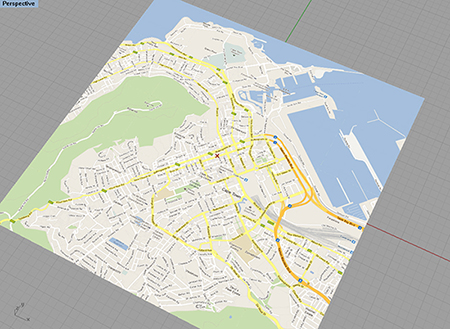
GoogleMaps: show google maps directly in the rhino viewport.
GoogleStock: Access Googles stock market values on the NASDAQ, the NYSE etc.
Mosquito is a plugin suite developed for Rhino and Grasshopper. The plugin allows us to tap into social , financial and popular media. Extracting location, profiles, images and messages from Facebook,Twitter, Topsy etc….
As architects part of our responsibility is the consideration of the public realm. Today however , people tend to hang in the digital equivalent, namely, social media space. While this space becomes ever more permanent, the physical realm is fleeting, an evanescent space.
With mobile tech at our disposal, both digital and physical are the same space. They intersect, and at this point new potential exists. Whether you agree or not with nature of social media, it is important to remain critical from both sides.
We are utilizing the tools in this component suite to bridge the gap between geometrics and information. Driving geometry with data and vice-versa. The ability to extract user Geo-coordinates, language, thoughts, profile and image enables architects to paint a picture. It is this 4-dimensional picture, which we refer to as “spatial condition”, that allows us to explore what happened yesterday, now and hypothesize about tomorrow. True 4-dimensional modeling.
Sonic MOSQUITO + Examples version 0.4c :>>>>>CLICK HERE
If you like it please support my work, that way I can devote more time to develop these plugins.TOOLS
The tools come packaged with Sonic (a vector plugin suite). Additional tools , such as String search and String duplicates are included with this package.
STREAMING CITY MAPS
FLICKR
The Flickr component allows you to search for photos and images based on Geo-Location, description, date, tags and user.
Search: Input the word you wish to search for.
Return: How many results you would like to get. 250 Max
StartDate: The oldest date you want to search from.
EndDate: The date you want to search up to.
Latitude: The Lat of your search center (Use our Location component to help you get the Lat and Lon)
Longitude: The Lon of your search center (Use our Location component to help you get the Lat and Lon)
Radius: The search radius you would like to perform , between 0km and 30km.
Units: What is the unit of measurement for you search radius.
hasGeo: Should the component only return results with Geo-Coordinates?
Tags: Should the search criteria pertain only to Tags, ignoring description of the image?
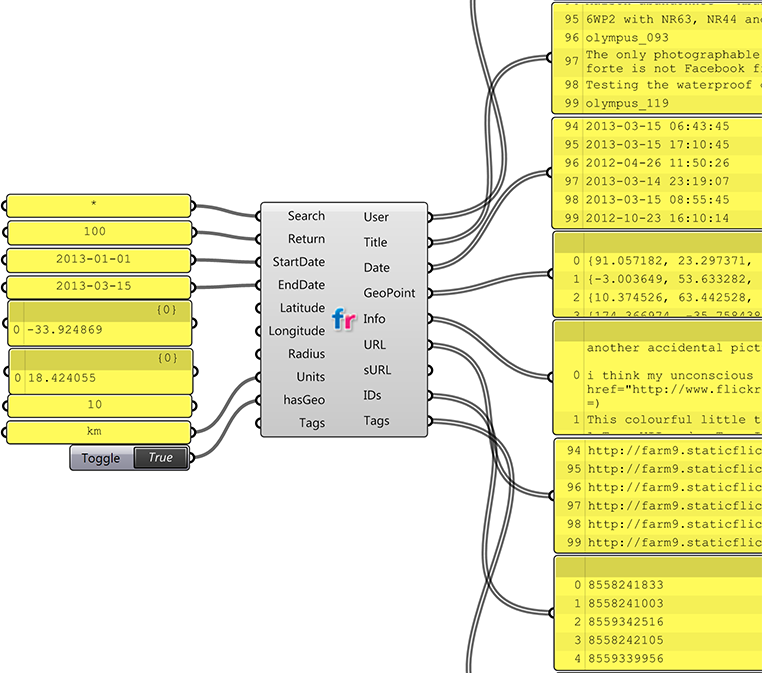
IMAGE-DOWNLOAD
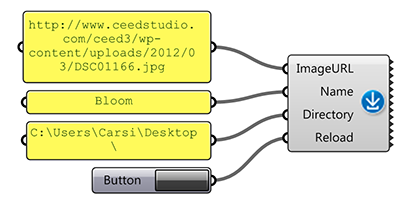
This component allows us to download images from a URL list and save them to a directory on our hard drives. This component is meant to be used with the Flickr and Twitter component.
ImageURL: The list of image http url you want to download.
Name: The name that should be given to the file.
Directory: The directory in which to save the image.
Reload: If toggled the images will be downloaded.
GOOGLE DIRECTIONS
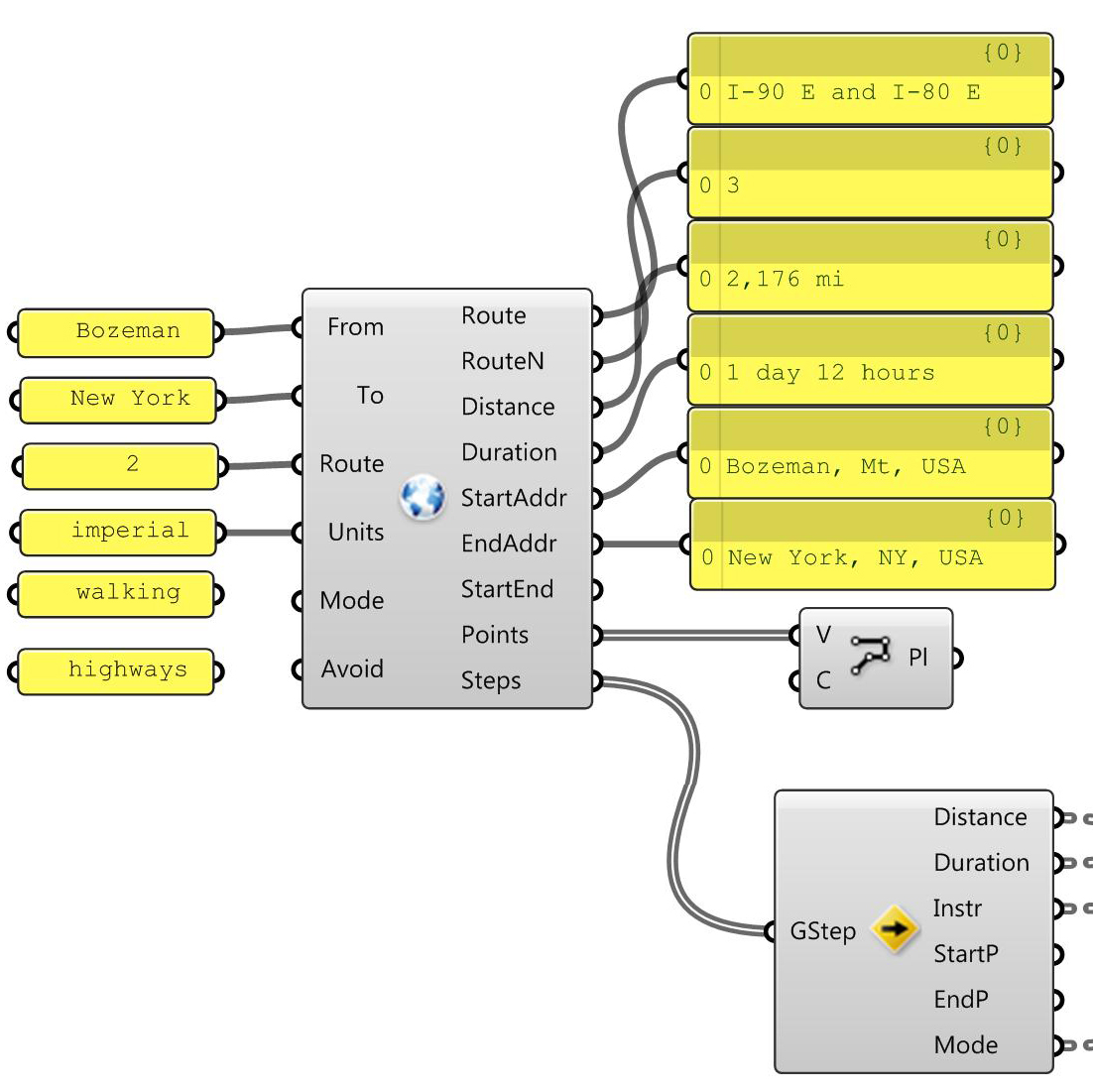
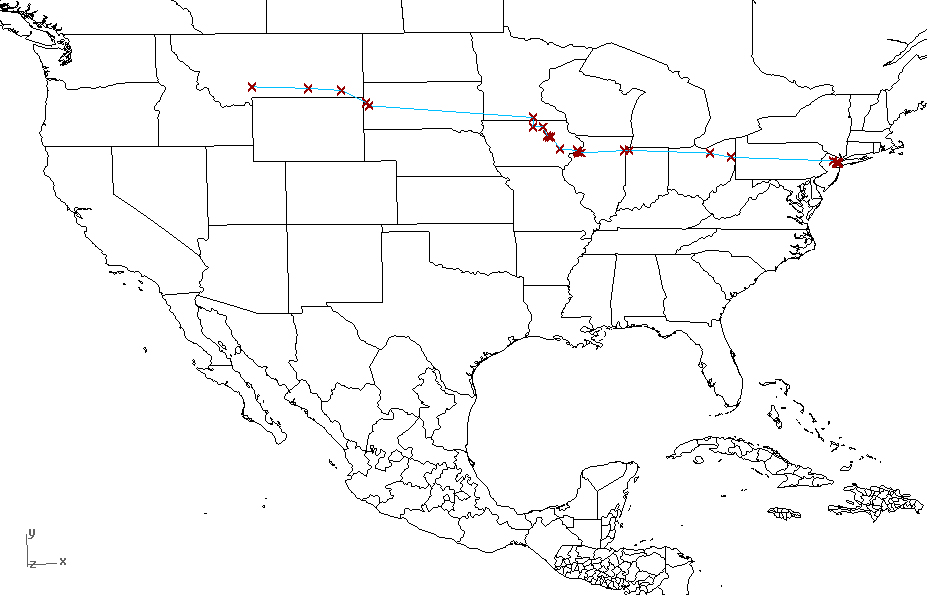
This plugin allows you to enter a start and end location by name and it will use Googles direction server to return the appropriate routes to drive, walk or bicycle.
It will also return the time and distance of a particular route.
STEPS
The step plugin will read the “Steps” output from the Directions component and give you the details from point to point for each leg of a journey.
SONIC LOCATION
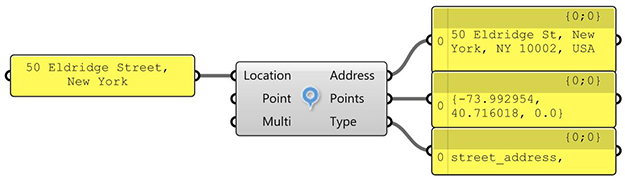
A reverse GeoCoding plugin that allows you to enter an address and it will return the closest locations it finds along with the Points of those locations.
GOOGLE MAPS
PLEASE NOTE: This plugin is very experimental , please save before you use it.
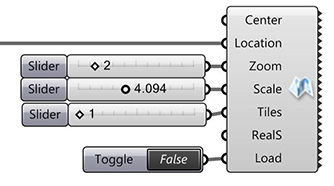
Center: The center specifies the center of the map in your Rhino space.
Location: Use the “Location” plugin to get the location point for the map, or create your own point using Lon and Lat coordinates.
Zoom: The zoom value of GoogleMaps
Scale: The size of the map tiles in Rhino.
Tiles: The number of tiles increases the extent of the map.
RealS: This is not accurate yet, please use wisely. It will in the future scale the map to RealWorld scale relative to Lon Lat dimensions.
Load: You need to turn this on and then off to reload the map, DO NOT LEAVE THIS ON TRUE or rhino will crash if you change the inputs too quickly.
GOOGLE STOCK MARKET
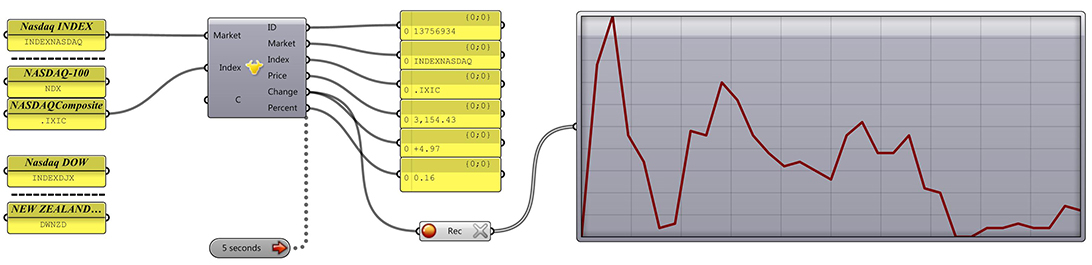
Insert the Market and the Index or company you wish to search and you should get the stock market values back in realtime.
TWITTER + TWITTERUSER
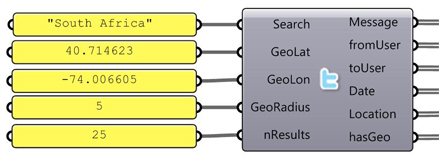
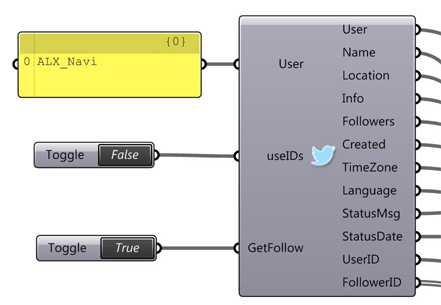
These two components allow you to extract live data and data going back roughly 4 weeks from Twitters API.
When used together the plugins can be very powerful, allowing you to track users, plot Geo-Coordinates and extract narrow your search. You can also extract follow IDs and compare them to other users.
Limits and Rules:
- You can only query Facebook 150 times per hour with each component. If you exceed this the component will turn Red!
- TwitterSearch: You can only search for 100 results at a time.
- TwitterUser: You can only search for 100 users at a time.
- TwitterUser: Maximum number of follower IDs is 5000.
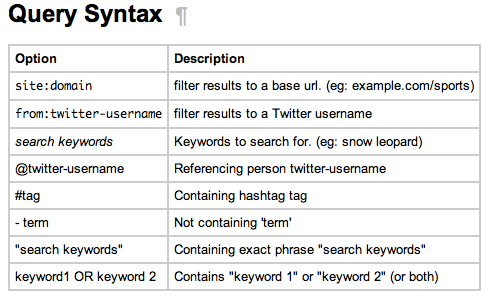
- Search Syntax is described below , please follow the link.
Query Syntax
First go to this URL to understand how to search for phrases:https://dev.twitter.com/docs/using-search
Here you will find a list of examples such as:
“happy hour” = will search for tweets containing the exact phrase “happy hour”
love OR hate = will search for tweets containing either “love” or “hate” (or both)
TOPSY
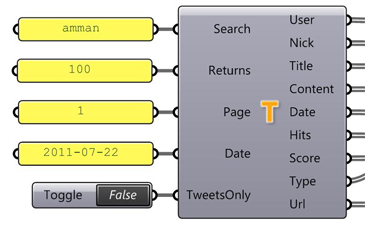
Topsy is an amazing search engine. It allow us to tap into the past. Whats more impressive, is that it allows us to search multiple forms of media in one go. Facebook, NYTimes, Twitter , YouTube etc…. the list goes on.
Limits and Rules:
- You can only get maximum 100 returns per page.
- Use the paging input to page through thousands of results.
- The date must be in the format below, and is the date you want to search from, back in time.
- The syntax used in the Search input is described below.
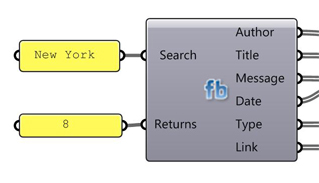
The Facebook component is very basic and allows you to extract posts, video and web links. Additionally it will also get the date, type and author of the post.
Limits and Rules:
- Returns only 500 at a time.
Discussion Forum
Facebook component missing 3 Replies
Hiv0.4 doesn't seem to have the Facebook component. Do I need to install v0.3 instead?Continue
Started by Paul Wintour. Last reply by Carson Smuts Mar 25.
Mac version of Mosquito
Hello everyone,I would like to get a sense of how many people would like to see a Mac version of Mosquito. Is there any demand for such a thing? I have had maybe 4 requests, but this is not enough to…Continue
Started by Carson Smuts May 31, 2022.
New Serial until Dec 2023
Here is the new Serial: GPDYP-AGOEN-PXUZK-KCDXV(Or you can re-download the plugin)Continue
Started by Carson Smuts May 31, 2022.
Mosquito Vector Maps not loading any data on Grasshopper
Hello All,I have been trying to use Vector Maps in Mosquito. I have typed in the latest serial number, but still the vector maps is not giving any output. I tried turning off the firewall- but it…Continue
Started by An Jun 14, 2021.
Comment Wall
Comment
-
Comment by Carson Smuts on March 25, 2024 at 10:52am
-
New Release Mosquito 2.0 - https://mosquito.synthetic.space/
(Tested on Rhino 6, 7, and 8.5 - Windows Only)Mosquito has been updated to a new .NET framework and a new serial has been issued. Either download the new version or enter the new serial manually. Serial and software is located on Mosquito site: https://mosquito.synthetic.space/
-
Comment by Marco Capitanio on June 14, 2023 at 6:55pm
-
@Carson, hello!
First of all, many thanks for your work and for sharing Mosquito.
I have just installed it as I would like to explore the social media components: however, I get the 'unauthorized' server error on both Twitter components (the Flickr one works fine).
I am on a personal computer, so there shouldn't be any firewall issues.
Sorry to bother, but could you please let me know if this is happening on my side only or if something like Twitter API has indeed changed?
Thank you and have a great rest of the week.
Marco
-
Comment by Lennart Appel on March 1, 2023 at 8:17am
-
I am really interested in a Mac Version of Mosquito. I am searching for a way to import mp3 files into grasshopper and generating 3D geometry
-
-
New Serial: GPDYP-AGOEN-PXUZK-KCDXV
Or you can re-download the plugin now.
-
Comment by CJ on March 5, 2022 at 8:47pm
-
@Carson Smuts thanks,may be my network speed is too slow,today everything already is ok.
-
-
@CJ... could you elaborate? Are you looking for the latest serial number?
Serial until June 2022:
MOGHO-IVKLB-JELJF-ONOME
-
-
emmm....im greeen hands so why expired that used 0.5a and new serial.
-
-
Mosquito SITE Maintenance:
I will be doing some site maintenance over the weekend and early next week so downloads for the Mosquito plugin will be suspended temporarily.Thanks
-
-
NEW Serial until June 2022:
MOGHO-IVKLB-JELJF-ONOME
-
Comment by Paul Drake on May 31, 2021 at 2:49pm
-
Looks like the serial for Vector maps is expired.
About
Welcome to
Grasshopper
Translate
Search
Photos

Videos
-
Scaling Tower
Added by Parametric House 0 Comments 0 Likes
-
Field Trap
Added by Parametric House 0 Comments 0 Likes
© 2024 Created by Scott Davidson.
Powered by


You need to be a member of Mosquito to add comments!