Grasshopper
Mantis Shrimp - new components
Grasshopper User Objects for importing Dynamo geometry:
- Point
- Line
- Arc
- Nurbs Curve
- Ellipse
- Circle
- Data (strings, floats etc)
- Nurbs Surface
- Mesh
These components will allow you to import geometry directly from Dynamo for easy manipulation in Grasshopper. One of the new and most crucial functionality that was added to Mantis Shrimp is ability to move data between the two programs. Moving geometry is great, but I am usually more interested in getting data out of Grasshopper. One of the tasks that comes up the most at work is to create schedules from set-out points in Grasshopper. As a matter of fact, for now I am usually using Lyrebird to write data back to Revit families. Eventually I want to get away from this workaround so I will be working next on some of that functionality. In case that you were wondering what I mean by "data" here's an example:
Grasshopper Twitter read using Mosquito plug-in:
...and that "data" (my last Tweet) sent to Dynamo:

What this new Data component does, is that it allows me to get away from attaching data to geometry as user strings (that component is still somewhat useful so I am not going to discontinue it just yet), and instead I can just send it over directly.
One more example of where Mantis Shrimp new components come handy is in case of some really simple geometry in Revit that can be quickly reconstructed in Grasshopper. Let's take Adaptive Components (AC) for example:

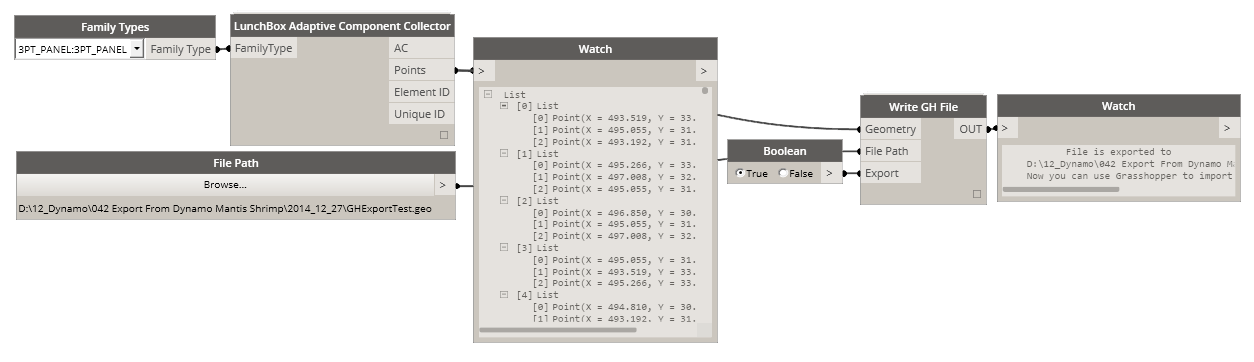
Using Lunchbox Adaptive Component Collector we can get all of the panels and their location points very easily. Then using Mantis Shrimp we can just as easily ship them out to Grasshopper and then re-create those same AC surfaces:

As you can see it takes exactly two (2) GH Components to re-create our surfaces in GH. Now, forget about those time consuming Import/Export workflows, you will not need them anymore.
Now, you probably noticed that since my AC families in Revit were made with three points, then when they were queried for location points the result was a list with three points for each panel. That creates an output of nested lists or in Grasshopper something called DataTree. In this case its important to retain that structure when points are being exported so that we know which three points make up which surface. Fret not, since Mantis Shrimp will retain your list structure on either import from GH or export from Dynamo.
These are just two really simple examples of how geometry exchanges can now be handled between Grasshopper and Dynamo (and somewhat Revit). Obviously it's not a world shattering improvement, but for someone like me who spends a lot of time in Grasshopper developing concepts, doing analysis - the ability to quickly move that knowledge to Dynamo and then Revit makes for an important improvement.
Here's what else is new in Mantis Shrimp:
New Paths:
Few extra paths were added in case that not everyone has their Rhino installed in the same place as mine. Unfortunately I am sure they will not cover all of the possible locations, so I am now considering adding an extra input that will allow users to specify location of the rhinocommon.dll library. Paths covered:
- C:\Program Files\Rhinoceros 5 (64-bit)\System\RhinoCommon.dll
- C:\Program Files\Rhinoceros 5.0 (64-bit)\System\RhinoCommon.dll
- C:\Program Files\McNeel\Rhinoceros 5.0\System\RhinoCommon.dll
If your Rhino is installed in any of the above locations you should be good, if not then you have to change that in every Dynamo node. Not fun :-( (maybe that extra input will be something that I have to do after all)
Units:
I also, added ability to read Units when importing geometry from a 3dm file. Since, Dynamo by default always operates in Meters then there is a string possibility that if your Rhino file was set up in units other than Meters that you were getting some out of scale imports. That should be fixed now, and here's what the new nodes look like:
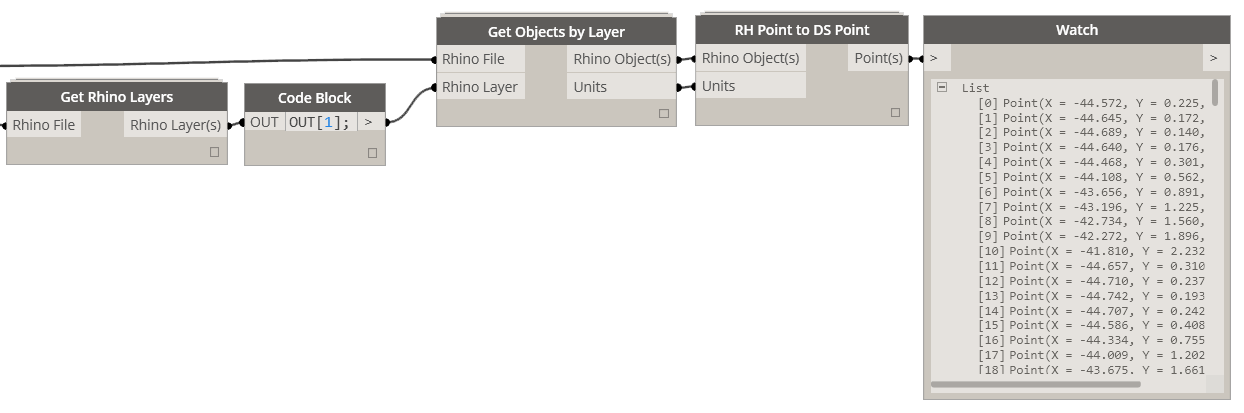
So far I only wrote conversion methods for some of the "possible" units in Rhino. Here's a list of units covered:
https://gist.github.com/ksobon/03bc9adea16f0c9670c9.js
These changes I think are a great improvement to Mantis Shrimp and in general Dynamo/Grasshopper workflows. I think next, I will look at generating native Revit elements. Schedules are first on my list, but other things like Drafting Views and Drafting Lines, Filled Regions etc are high up there. If I am not too busy at work next week, I might have some examples and new workflows for Mantis Shrimp. Stay tuned.
Andrew Heumann
this is fabulous work Konrad!
Jan 5, 2015